- Best Linux Tablets 2026: Top Picks for Consumers, Developers, and Industrial Users
- What is a Linux Tablet?
- Why Choose a Linux Tablet in 2026?
- Native Linux Tablets: Out-of-the-Box Freedom
- Perfect Ported Solutions: The Second-Hand Value Kings
- Industrial & Professional: High-Reliability Customization
- Core Decision Guide: What Should You Look For?
- 2026 Linux Tablet Comparison Summary
- Why Choose Linux Over Windows or Android for Industrial Rugged Tablets?
- 2026 Technical Standards: What Makes a Linux Tablet Truly "Rugged"?
- Rugged Linux Tablets by Region and Industry (2026 Trends)
- Key Industry Applications for Rugged Linux Terminals
- FAQ: Essential Insights on Rugged Linux Tablets
In 2026, finding the perfect Linux tablet is no longer about “if it’s possible,” but rather about “how much you want to tinker.” For users who prioritize freedom, privacy, and a mobile development environment, the market has matured into three distinct tiers: Native Pre-installs, Perfect Community Ports, and Industrial-Grade Customizations.
This guide filters the best options currently available based on hardware compatibility depth and user intent.
Best Linux Tablets 2026: Top Picks for Consumers, Developers, and Industrial Users
Looking for the best Linux tablet 2026 or rugged Linux tablet for harsh environments? Whether you’re a developer seeking native Ubuntu support, a tinkerer exploring ARM Linux, or an enterprise buyer needing industrial Linux tablets with CAN bus and wide voltage input, this updated guide covers the top options.
Popular searches include “rugged Linux tablet for mining”, “vehicle mount Linux tablet”, “Ubuntu Linux tablet industrial”, and “best Linux tablet for field service USA/Europe/Australia”. In 2026, demand is growing strongly in North America, Europe, Middle East oil & gas, Australian mining, and Asian manufacturing hubs.
What is a Linux Tablet?
A Linux tablet is a portable touchscreen device running a Linux-based operating system, offering deep customization, open-source freedom, and more control than Android/iOS, often achieved through specialized distributions like postmarketOS, Ubuntu Touch, or ChromeOS variants (like FydeOS) that adapt traditional desktop Linux for touch, balancing PC power with mobile usability for developers, privacy advocates, or hobbyists.
Why Choose a Linux Tablet in 2026?
Linux tablets offer unmatched open-source freedom, superior privacy (no telemetry), and excellent customization. For best rugged Linux tablet for industrial use 2026, they withstand drops, dust, and extreme temperatures while running stable distributions like Ubuntu, Fedora, or Debian. In 2026, we expect even better touch optimization via Wayland and more powerful ARM/x86 hybrids.
My view: Rugged Linux tablets represent the future of field computing. Unlike consumer Android devices, they combine enterprise-grade durability with true open-source control—perfect for industries where data security and reliability trump flashy features.
Native Linux Tablets: Out-of-the-Box Freedom
These tablets are designed from the ground up to run Linux. They come with pre-installed operating systems (like Ubuntu Touch, Manjaro ARM, or Mobian) and drivers that are already optimized.
1. StarLite Mk V (Best Performance x86)
- Core Specs: Intel N200 | 16GB RAM | 512GB+ SSD
- The Highlight: This is the closest thing to a “flagship tablet” for Linux. With a 12.1-inch 2K display, it supports a precision stylus and a magnetic backlit keyboard.
- Best For: Developers who need a full desktop-grade Linux environment for VS Code, Docker, and heavy multitasking.
2. PineTab 2 (Best Value for Geeks)
- Core Specs: RK3566 (ARM) | 4GB/8GB RAM
- The Highlight: Driven by the Pine64 community, this hardware is completely transparent. It is the most affordable platform for learning ARM Linux and kernel development.
- Best For: Tinkers on a budget who want a pure open-source playground and don’t mind experimental software.
3. Juno Tab 3 (The Ubuntu Specialist)
- Core Specs: Intel N100 | 12GB LPDDR5 | 12.1-inch Screen
- The Highlight: Specifically optimized for Ubuntu 24.04 LTS, it offers a reliable, familiar experience with a solid mid-range x86 processor.
- Best For: Users who want the Ubuntu ecosystem in a portable form factor without the hassle of manual installation.
Perfect Ported Solutions: The Second-Hand Value Kings
These devices originally shipped with Windows or Android. However, thanks to powerful community projects like linux-surface, they offer a near-native Linux experience.
1. Microsoft Surface Go 2 / 3 / 4 (The Ultra-Portable Gold Standard)
- Status: Using the
linux-surfacekernel, touchscreens, Wi-Fi, and power management are excellently supported. - Pro Tip: Avoid the first generation. Choose the 8GB RAM version of the Go 2 or 3 for the best experience.
- The Catch: Cameras can still be a “pain point” and may require complex manual configuration on certain distros.
2. Lenovo ThinkPad X12 Detachable
- Status: ThinkPads are legendary for Linux support. This is the “professional” alternative to the Surface Pro.
- The Highlight: Excellent keyboard feel and superior driver compatibility for almost all internal components.
Industrial & Professional: High-Reliability Customization
In environments like mining, logistics, or field research, consumer tablets fail. This is where ruggedized Linux hardware becomes essential.
1. Waysion SYVR10R (Rugged Linux Terminal)
- Positioning: Built for vehicle-mount and harsh industrial environments with an IP67 rating.
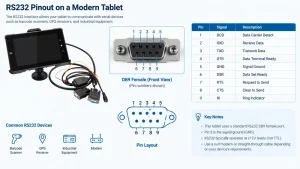
- Technical Edge: Based on the RK3568 architecture, it supports a Dual-OS (Android/Linux) setup. Its true value lies in its rich I/O interface (CAN bus, RS232, RS485, RJ45), making it the ideal mobile terminal for embedded control systems and precision agriculture.
Regional Applications & Availability: Waysion rugged Linux tablets are widely deployed in US oilfields, European logistics fleets, Australian mining operations, and Middle East construction sites. Local partners in these regions provide on-site support, customization, and faster delivery for industrial Linux tablet projects.
Core Decision Guide: What Should You Look For?
1. Architecture: ARM vs. x86
- x86 (Intel/AMD): Compatible with all desktop software; high performance; but shorter battery life and more heat.
- ARM (Rockchip/Allwinner): Superior battery life and portability, but some proprietary software (like Zoom or specific drivers) may lack native support.
2. Choosing the Right UI (Desktop Environment)
Your tablet experience is 90% determined by the interface:
- Phosh (GNOME): The most mature touch interface for Linux today. Stable and intuitive.
- Plasma Mobile (KDE): Highly customizable and feature-rich; great for users who like to tweak their UI.
- Ubuntu Touch: The most “mobile-like” experience with gesture-based navigation, though its app ecosystem is more curated/limited.
3. The Must-Have Tool: Waydroid
No matter which tablet you choose, Waydroid is essential. It allows you to run Android apps at near-native speeds on Linux, bridging the gap for mobile apps that don’t have a Linux equivalent.
2026 Linux Tablet Comparison Summary
| Model | Recommendation | Architecture | Compatibility Level |
| StarLite Mk V | Top-tier build & performance | x86 (Intel) | Native |
| Surface Go 3 | Best portable refurbished pick | x86 (Intel) | Community Port (High) |
| PineTab 2 | The ultimate geek’s toy | ARM (RK3566) | Native / Open-Source |
| Waysion SYVR10R | Industrial/Vehicle Productivity | ARM (RK3568) | Native / Ruggedized |
Why Choose Linux Over Windows or Android for Industrial Rugged Tablets?
When selecting a rugged mobile terminal, the operating system (OS) is just as critical as the hardware durability. While Android is consumer-friendly and Windows is standard for office tasks, Linux is the powerhouse for industrial automation and specialized mission-critical applications.
- Total Kernel Control: Linux grants developers direct access to hardware layers. This is essential for custom drivers, such as specialized CAN-bus protocols or proprietary FPGA interfaces used in high-end industrial machinery.
- Long-Term Support (LTS): Unlike the fragmented Android ecosystem, Linux distributions like Ubuntu LTS or Debian offer guaranteed security updates for 5–10 years, aligning perfectly with the long lifecycles of B2B hardware.
- System Stability & Resource Efficiency: By stripping away unnecessary GUIs and background processes, Linux ensures maximum uptime and real-time responsiveness, even in extreme temperatures or high-vibration environments.
- Open-Source Security: For defense, energy, and government projects, the open-source nature of Linux allows for full code auditing, mitigating the risk of data leaks and backdoors.
2026 Technical Standards: What Makes a Linux Tablet Truly “Rugged”?
To survive the rigors of the field, a Linux tablet must go beyond basic “toughness.” Look for these advanced specifications:
- Optical Bonding & Sunlight Readability: High brightness (1000+ nits) is only half the battle. Optical Bonding technology eliminates the air gap between the LCD and the touch glass. This reduces internal reflections by over 90%, ensuring crystal-clear visibility under direct sunlight while significantly increasing the screen’s structural integrity.
- Advanced Power Management for Vehicles: A professional Linux rugged tablet should feature Wide Voltage Input (9V–36V) and Ignition Sense (ACC) technology. This prevents device reboots or hardware damage during engine cranking or voltage spikes in heavy machinery.
- Native Support for Industrial Protocols: For logistics and agriculture, integrated Isolated CAN-bus (J1939/CANopen) and RS232/485 ports are vital. Under Linux, these ports can be interfaced directly via SocketCAN, drastically simplifying the development of diagnostic and control software.
Rugged Linux Tablets by Region and Industry (2026 Trends)
- North America & Europe: Strong demand for MIL-STD-810H certified Linux tablets in defense, public safety, and fleet management. Ubuntu LTS preferred for long-term compliance.
- Australia & Mining: High-brightness (1000+ nits), glove-mode touch, and GNSS integration for outdoor precision operations.
- Middle East & Oil & Gas: Wide temperature range (-20°C to 60°C) and explosion-proof considerations with robust I/O (RS485, CAN).
- Asia Manufacturing: Cost-effective ARM-based solutions like Waysion SYVR10R for factory automation and vehicle terminals.
These adaptations make Linux rugged tablets ideal across global industrial markets.
Key Industry Applications for Rugged Linux Terminals
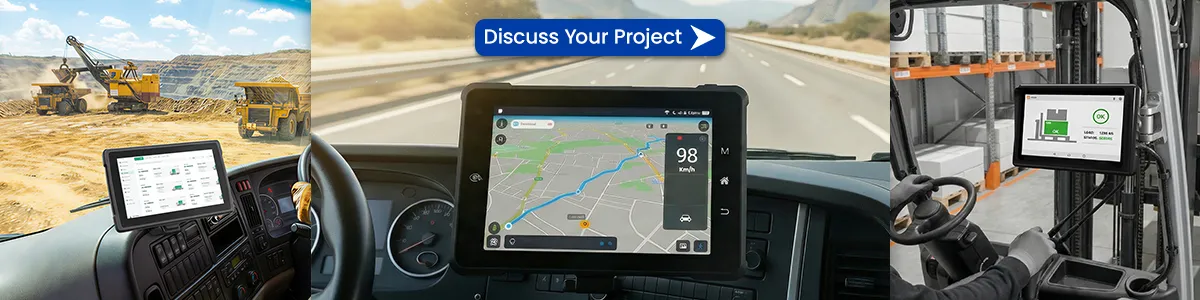
- Precision Agriculture: Farmers utilize Linux tablets to interface with GNSS receivers and hydraulic controllers for autonomous steering and precision fertilizer application.
- Fleet Management & Vehicle Telematics: In mining and heavy-duty trucking, Linux devices act as smart gateways, collecting real-time engine data and fuel consumption analytics for cloud-based fleet optimization.
- Public Safety & Field Research: With IP67/IP68 ingress protection and MIL-STD-810H certification, these tablets serve as reliable data collection hubs in extreme weather conditions where consumer tablets would fail.
FAQ: Essential Insights on Rugged Linux Tablets
Q: Which Linux distribution is best for rugged hardware?
A: Ubuntu offers the most extensive community and driver support. Debian is the go-to for rock-solid stability. For highly specialized hardware, the Yocto Project is the preferred choice for building lightweight, custom-tailored OS images.
Q: Do rugged Linux tablets support gloved-hand operation?
A: Yes. Professional tablets use Projected Capacitive (PCAP) touchscreens with “Glove Mode” or “Rain Mode” firmware. This ensures precision touch even when the user is wearing heavy safety gloves or the screen is wet.
Q: How do these tablets handle Edge AI tasks?
A: Modern Linux-based tablets (built on Rockchip or NXP architectures) often feature integrated NPUs (Neural Processing Units). This allows for local execution of AI models for object recognition or predictive maintenance without relying on a cloud connection.
Q: Where to buy rugged Linux tablets in USA/Europe/Australia?
A: You can purchase rugged Linux tablets directly from manufacturers like Waysion via their official website, which offers global shipping and customization services. In the USA, look for authorized industrial distributors or contact Waysion’s North American partners for local support, faster delivery, and compliance with regional standards. In Europe, Waysion and other suppliers (such as those offering E-Mark certified units) provide localized service and warranty. In Australia, rugged Linux tablets are popular in mining and logistics — Waysion and specialist resellers like ruggedcomputing.com.au stock or can source models with strong GNSS and high-brightness support. For bulk industrial projects, we recommend contacting manufacturers directly for volume pricing, on-site customization, and dedicated technical support in your region.
Q: Do Linux rugged tablets support 5G and global LTE bands?
A: Yes, many modern rugged Linux tablets support 5G and global LTE bands. Industrial models like Waysion’s SYVR10R and similar devices from other manufacturers often include optional or built-in 5G/4G LTE modules with multi-band compatibility for worldwide roaming. This ensures reliable connectivity in remote areas for fleet management, mining, and field service applications. Look for models with ModemManager/NetworkManager support under Linux (common on Ubuntu/Debian-based systems) for easy configuration. Always verify specific frequency bands with the supplier to match your carrier’s network in the USA, Europe, Australia, or other regions.
Q: How does Linux compare to Android for industrial data security?
A: Linux generally offers stronger advantages for industrial data security compared to consumer Android. Key benefits include:
- Full transparency and auditability: As open-source, Linux allows complete code review and custom hardening — critical for defense, energy, and government projects with no hidden telemetry.
- Long-term support: Ubuntu LTS and Debian provide 5–10 years of security updates, aligning with industrial hardware lifecycles.
- Lower attack surface: You can run minimal, stripped-down distributions without bloatware, reducing vulnerabilities.
- Better control over permissions and networking: Direct kernel access enables fine-tuned firewalls, SELinux policies, and industrial protocol isolation (e.g., CAN bus).
Android excels in app sandboxing and consumer convenience but often includes more Google services and a larger, more fragmented ecosystem that can introduce risks in sensitive industrial environments. Many rugged devices (including Waysion models) support dual Android/Linux boot, letting you choose Linux for mission-critical operations where security and stability are paramount.
Final Thoughts
In 2026, the Linux tablet market is clearly stratified: if you need a productivity powerhouse, look at x86 Native or the Surface line. If you need industrial stability, Waysion’s rugged series is the clear choice. For the pure joy of open-source, PineTab remains the king.
Conclusion: For most industrial users in 2026, a purpose-built rugged Linux tablet like Waysion SYVR10R offers the best balance of durability, open-source flexibility, and industrial I/O. Consumer Linux tablets suit developers, while rugged models dominate field operations worldwide.
Ready to find the right model? Contact our team for customization, regional pricing, or demo units.
Explore All Rugged Tablets | Vehicle Mount Computers | [Contact for Quote]
Tags: Best linux tablet, Linux tablet, linux tablet 2025, linux tablet android, linux tablet computer, Linux Tablet Computers, linux tablet medicine, linux tablet ubuntu, Rugged Linux tablet